A website can look beautiful, load quickly and work perfectly on your own computer, yet still be difficult or even impossible for some people to use.
Imagine visiting a website and being unable to understand what an image shows because there is no text alternative. Imagine trying to complete a booking form using only a keyboard and discovering that you cannot reach the buttons. Or imagine watching an important video without being able to hear the audio and finding that there are no captions.
For millions of people, these are not unusual situations. They are everyday barriers on the internet.
This is where WCAG comes in.
WCAG stands for Web Content Accessibility Guidelines. These internationally recognised guidelines provide a framework for making websites, applications and digital content more accessible to people with disabilities.
But accessibility is not only about disability. A website that is easier to navigate, easier to read and easier to understand can be better for everyone.
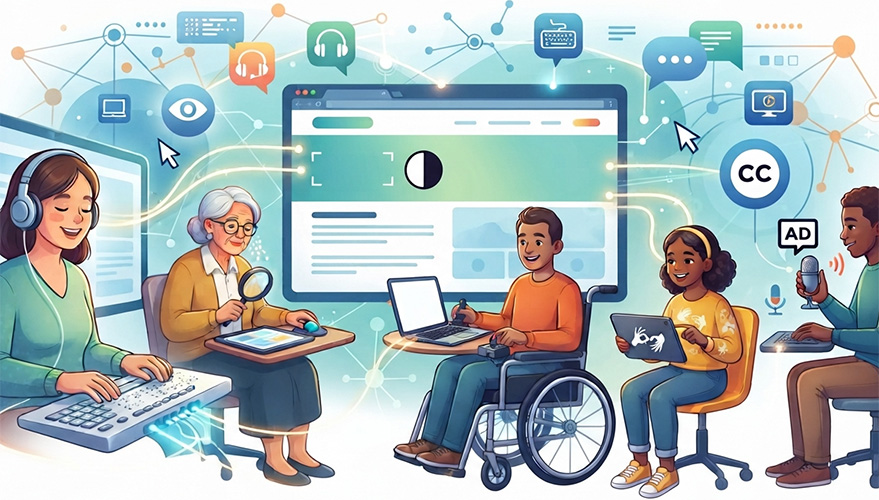
In this guide, we will explain what WCAG means, why it matters, the different WCAG versions and compliance levels, the accessibility rules that apply in Ireland, how other countries approach accessibility, how you can check your own website and, most importantly, what you can do to make your website genuinely accessible.
WCAG Sections In This Article
What Is WCAG and Why Is It Important?
WCAG stands for Web Content Accessibility Guidelines.
The guidelines are developed by the World Wide Web Consortium, usually known as W3C, through its Web Accessibility Initiative. WCAG is an international standard designed to explain how digital content can be made more accessible to people with disabilities.
The idea behind WCAG is quite simple.
The internet should not create unnecessary barriers.
People should be able to find information, read content, complete forms, purchase products, make bookings, watch videos and use online services regardless of whether they have a visual, hearing, physical, speech, cognitive or neurological disability.
WCAG is built around four basic principles.
1. Perceivable
Information should be presented in ways that people can perceive.
For example, an image should have a meaningful text alternative where one is needed. Videos may need captions. Text should have sufficient contrast against its background. Content should not rely entirely on colour to communicate important information.
The basic question is this:
Can the visitor actually perceive the information?
2. Operable
People should be able to use and navigate the website.
This includes people who cannot use a mouse easily and instead navigate with a keyboard or another assistive technology.
Buttons, menus, forms, links and other interactive elements need to be usable. Visitors should also have enough time to read and interact with content where timing is involved.
The question here is:
Can the visitor actually operate the website?
3. Understandable
A website should behave in a predictable and understandable way.
Navigation should be consistent. Forms should provide useful instructions. Error messages should help people understand what went wrong and how to correct it.
Good accessibility is not about making a website complicated. In many cases, it means making the website clearer.
The question is:
Can the visitor understand what is happening and what they need to do?
4. Robust
The website should work reliably with different browsers, technologies and assistive technologies.
This is particularly important because people may use screen readers, keyboard navigation, voice control, magnification tools and other technologies to access the web.
The question is:
Can the website continue to work when people access it in different ways?
These four principles are the foundation of WCAG. W3C currently describes WCAG 2.2 using these four principles: perceivable, operable, understandable and robust.
Why Website Accessibility Matters
There is a human reason to care about accessibility, and there is also a very practical business reason.
An inaccessible website can exclude potential customers.
If someone cannot navigate your website, understand your content, complete your contact form or purchase your service, you may lose that person before they ever have an opportunity to become a customer.
Accessibility can also improve the experience for people who do not consider themselves disabled.
Think about someone using a phone in bright sunlight. Someone watching a video in a noisy environment. Someone with a temporary injury who cannot comfortably use a mouse. Someone who is tired and finds a complicated website difficult to navigate.
Accessible websites tend to remove unnecessary obstacles.
Accessibility can also support better usability, clearer content and a more thoughtful overall online experience.
And increasingly, accessibility is not simply a matter of doing the right thing. In many countries, legislation and public sector requirements have made digital accessibility a formal obligation for certain organisations.
That brings us to compliance.
What Types of WCAG Are There?
There are two different things people often mean when they talk about “types of WCAG”.
They may be talking about versions, such as WCAG 2.0, WCAG 2.1 and WCAG 2.2.
Or they may be talking about conformance levels, which are A, AA and AAA.
Understanding both is important.
WCAG 2.0
WCAG 2.0 was published by W3C in 2008 and established the foundation of the modern WCAG framework.
It introduced testable requirements called success criteria and organised them under the four principles of accessibility.
Although WCAG 2.0 is an older version, it remains relevant because many laws, policies and contracts around the world still refer to it.
WCAG 2.1
WCAG 2.1 was published to build on WCAG 2.0.
It retained the existing WCAG 2.0 requirements and introduced additional success criteria, including requirements that addressed areas such as mobile accessibility, low vision and cognitive accessibility.
WCAG 2.1 is particularly important in Ireland because the Irish regulations implementing the EU Web Accessibility Directive use the relevant European accessibility standard based broadly on WCAG 2.1 Level AA for public sector websites and mobile applications.
WCAG 2.2
WCAG 2.2 is the current version of WCAG 2.
It was published as a W3C Recommendation in October 2023 and adds nine new success criteria compared with WCAG 2.1. These include requirements relating to focus visibility, dragging movements, target size, consistent help, redundant entry and accessible authentication.
The important thing to understand is that WCAG 2.2 did not simply replace everything that came before it.
WCAG 2.2 builds on WCAG 2.1. The earlier success criteria remain largely in place, with one WCAG 2.0 requirement concerning parsing becoming obsolete and being removed from WCAG 2.2.
For a new website, it therefore makes sense to consider the latest WCAG guidance rather than deliberately building to an older standard without a specific reason.
What Do WCAG A, AA and AAA Mean?
This is where things become easier than they may initially sound.
WCAG has three levels of conformance:
Level A
Level AA
Level AAA
Level A is the minimum level.
Level AA includes all Level A requirements plus the Level AA requirements.
Level AAA includes Level A, Level AA and Level AAA requirements.
WCAG Level A
Level A addresses the most fundamental accessibility barriers.
Failing some Level A requirements can make parts of a website extremely difficult or completely impossible for certain visitors to use.
It is therefore the starting point, but for most professional websites, stopping at Level A is not considered sufficient.
WCAG Level AA
Level AA is generally the practical target for organisations that want a strong and widely recognised level of accessibility.
It addresses a much broader range of barriers, including things such as colour contrast, keyboard accessibility, navigation, forms and other aspects of the user experience.
In Ireland, public sector organisations commonly refer to WCAG 2.1 Level AA as the target for compliance with the relevant accessibility framework.
WCAG Level AAA
AAA is the highest level.
That does not automatically mean every website should attempt to claim full AAA conformance.
W3C itself explains that requiring Level AAA for an entire website is generally not recommended because it is not possible to satisfy every AAA success criterion for some types of content.
For most organisations, WCAG Level AA is the sensible benchmark.
It offers a strong level of accessibility without making unrealistic promises about achieving every possible AAA requirement.
What Does WCAG Compliance Actually Mean?
This is an important distinction.
A website is not “WCAG compliant” simply because someone installed an accessibility plugin.
It is also not automatically compliant because an online scanner gives it a high score.
WCAG conformance is based on satisfying the applicable success criteria at the relevant level. W3C explains that for Level AA, a page needs to satisfy all applicable Level A and Level AA success criteria, subject to the formal WCAG conformance requirements.
This is why accessibility testing needs to go further than clicking a button and waiting for a score.
Automated tools are extremely useful.
They can identify many common problems quickly, such as missing alternative text, certain colour contrast problems, form issues and other detectable errors.
However, automated testing cannot understand everything a human visitor experiences.
W3C specifically warns that no single evaluation tool can determine whether a website is accessible. Human evaluation is required as part of a meaningful accessibility assessment.
In other words, a green accessibility score does not give you a magic certificate.
Real accessibility requires testing.
How Can You Check Whether Your Website Is Accessible?
If you have a website today, you do not need to be an accessibility specialist to start checking it.
There are several useful tools available online.
WAVE
WAVE is a popular web accessibility evaluation tool developed by WebAIM.
It can analyse a page and highlight many accessibility issues directly on the page.
It is particularly useful for getting a quick visual understanding of potential problems.
axe DevTools
axe is another widely used accessibility testing tool.
The axe ecosystem can identify many WCAG related problems and is commonly used by teams during development and testing. W3C includes axe and WAVE among the accessibility evaluation tools available in its evaluation tools resources.
Lighthouse
Google Chrome’s Lighthouse auditing tools can also identify accessibility issues.
It can be useful for an initial check, especially if you are already using Chrome for your website testing.
But once again, it should be treated as a starting point rather than a final accessibility certificate.
W3C Accessibility Evaluation Resources
W3C maintains a large directory of accessibility evaluation tools. The directory contains more than 100 tools and allows people to explore different approaches to accessibility testing.

The most important advice is not to rely on just one tool.
Run automated tests.
Check the website manually.
Try navigating it using only a keyboard.
Check forms.
Check headings and navigation.
Test important pages on different screen sizes.
Where appropriate, test with assistive technologies.
And, ideally, include people with different accessibility needs in the testing process.
What About Accessibility Laws in Ireland?
Ireland has a number of laws and regulations relevant to disability and accessibility.
For websites, one of the most important pieces of legislation is the European Union (Accessibility of Websites and Mobile Applications of Public Sector Bodies) Regulations 2020, known as S.I. No. 358/2020.
These regulations implemented the EU Web Accessibility Directive into Irish law.
They apply to websites and mobile applications of public sector bodies and require accessibility measures based on the relevant European accessibility standard. In practical terms, the standard is broadly aligned with WCAG 2.1 Level AA for web content.
Public sector organisations also have obligations concerning accessibility statements.
An accessibility statement explains the accessibility status of a website or application, identifies known areas where it does not fully comply and provides a way for users to provide feedback or request assistance.
Irish government websites provide real world examples of this approach. Gov.ie, for example, publishes an accessibility statement and states its commitment to WCAG 2.1 AA. It also acknowledges that some external content, including certain PDFs and embedded content, may not fully conform.
That last point is worth remembering.
Accessibility is not only about the homepage.
A website can have an accessible homepage and still contain inaccessible PDFs, forms, videos, tables or third party services.
The European Accessibility Act
Ireland is also affected by the European Accessibility Act, or EAA.
The EAA introduced mandatory minimum accessibility requirements for certain products and services across the European Union.
The Directive came into effect on 28 June 2025 and was transposed into Irish law through the European Union (Accessibility Requirements of Products and Services) Regulations 2023.
The EAA covers specific products and services rather than automatically making every private website subject to one universal WCAG requirement.
This distinction is important.
Whether your organisation has a specific legal obligation depends on what your business does, what service you provide, who you provide it to and which legislation applies to your situation.
So if you are unsure whether accessibility requirements legally apply to your particular business, professional legal advice is appropriate.
However, there is an important practical point.
Waiting until accessibility becomes a legal problem is rarely a good strategy.
Building accessibility into a website from the beginning is usually far easier than trying to repair a website after years of inaccessible content, outdated templates and complicated functionality have accumulated.
What Are Other Countries Doing About Website Accessibility?
Ireland is certainly not alone in treating digital accessibility seriously.
Different countries have approached the issue through different combinations of accessibility laws, discrimination legislation, public sector requirements and technical standards.
United States
In the United States, the Americans with Disabilities Act has played an important role in discussions around digital accessibility.
The US Department of Justice has also introduced specific web and mobile accessibility requirements for state and local governments under Title II of the ADA.
The rule uses WCAG 2.1 Level AA as the technical accessibility standard for covered web content and mobile applications.
There have also been developments to the compliance timetable.
As of 2026, the US Department of Justice has extended the compliance dates for certain state and local government entities. Governments serving populations of 50,000 or more have a compliance date of 26 April 2027, while smaller covered entities and special district governments have a compliance date of 26 April 2028.
This demonstrates how accessibility is increasingly being treated as an essential part of public digital services rather than an optional extra.
Canada
Canada also uses accessibility standards in its public sector and broader accessibility framework.
Accessibility Standards Canada references WCAG 2.1 Level AA for web pages under the relevant EN 301 549 based requirements.
The Canadian approach is another example of how WCAG has become an important international reference point for digital accessibility.
Across major markets, the exact legal requirements differ, but the overall direction is clear.
Accessible digital services are becoming the expectation rather than the exception.
What Does an Accessible Website Look Like?
You might now be wondering what all of this actually means when you look at a normal website.
In practical terms, an accessible website should make everyday tasks easier.
Visitors should be able to navigate the site without getting lost.
Headings should make sense and provide a logical structure.
Text should be readable.
Colours should provide sufficient contrast.
Links should make sense without relying entirely on surrounding text.
Images should have appropriate alternative text when the image communicates information.
Forms should be clearly labelled.
Errors should be explained in a way that helps the visitor fix them.
Interactive elements should be usable from a keyboard.
Visitors should be able to see where keyboard focus is.
Videos should have appropriate captions where needed.
Content should not rely solely on colour to communicate important information.
Animations and moving content should not create unnecessary problems for users.
The website should behave consistently.
And perhaps most importantly, visitors should be able to understand what the website is asking them to do.
Accessibility is therefore not a separate feature that sits somewhere in the corner of a website.
It affects the entire experience.
How to Achieve Strong WCAG Compliance for Your Website
If you want your website to meet WCAG requirements, the best approach is to treat accessibility as part of the entire website lifecycle.
Do not leave it until the very end.
Start With an Accessibility Audit
The first step is to understand where you currently stand.
An accessibility audit can identify issues across important pages and functions.
This should include automated testing as well as manual checks.
The goal is not simply to produce a huge list of technical errors.
The goal is to understand which problems are preventing people from using your website and then fix them in a sensible order.
Review Your Website Structure
A well structured website is easier for both people and assistive technologies to understand.
Review your headings, navigation, links, forms and page layouts.
Ask yourself whether someone unfamiliar with your website could understand the structure without needing additional help.
Check Colour and Readability
A beautiful colour palette is not necessarily an accessible colour palette.
Text needs sufficient contrast against its background.
Do not use tiny text simply because it looks elegant.
Do not rely on very subtle colours for important information.
Your website should remain comfortable to read across different devices and viewing conditions.
Make Images Meaningful
Images are often forgotten when accessibility is discussed.
If an image communicates important information, the visitor needs an alternative way to understand that information.
At the same time, decorative images do not necessarily need lengthy descriptions.
The objective is not to describe every pixel.
The objective is to communicate the information that matters.
Make Forms Accessible
Forms are one of the most important parts of many business websites.
Contact forms, registration forms, checkout pages, application forms and booking systems all need careful attention.
A visitor should be able to understand what information is required.
If something goes wrong, the website should clearly explain the problem.
Users should not have to guess why their submission failed.
Test Keyboard Navigation
Try using your website without a mouse.
Can you move through the navigation?
Can you open menus?
Can you reach buttons?
Can you complete forms?
Can you close pop ups?
Can you always tell where you are on the page?
This simple exercise can reveal problems that an automated scanner may not fully explain.
Test With Real Assistive Technologies
Accessibility is ultimately about real people.
Where appropriate, websites should be tested with technologies such as screen readers and other assistive tools.
Different users have different needs, so there is no single test that represents every experience.
Check PDFs and Other Documents
This is an area many organisations overlook.
Your website might be accessible while the downloadable documents are not.
Irish public sector websites regularly identify PDFs as an accessibility challenge in their accessibility statements.
If an important service or piece of information is available only in an inaccessible document, the visitor can still face a significant barrier.
Where possible, important information should be provided directly in accessible HTML, while necessary documents should also be prepared with accessibility in mind.
Think About Third Party Services
Your website may contain booking systems, payment systems, maps, video players, forms, customer portals or other external services.
You do not control every part of these systems.
However, they can still affect the experience of your visitors.
Third party content should therefore be considered as part of your overall accessibility review.
Keep Testing After Launch
Accessibility is not something you complete once and forget.
Websites change.
New pages are added.
Images are uploaded.
Plugins are installed.
Forms are redesigned.
Marketing teams publish new content.
A previously accessible website can gradually develop new accessibility problems.
That is why accessibility should become part of ongoing website maintenance.
Accessibility Is More Than a Compliance Exercise
It is tempting to look at WCAG as a list of rules that need to be ticked off.
But that misses the bigger picture.
At its heart, accessibility is about allowing more people to participate.
Someone should not be prevented from learning about your business because an image has no alternative text.
Someone should not abandon your enquiry form because it cannot be completed with a keyboard.
Someone should not be unable to understand your video because there are no captions.
Someone should not struggle through your website because the navigation is confusing.
These are not merely technical problems.
They are barriers between people and information.
And removing those barriers can improve the website for everyone.
Need Help Making Your Website WCAG Accessible?
Achieving strong WCAG compliance can be difficult if accessibility was not considered when the website was originally created.
Sometimes the problems are small and straightforward.
Sometimes they are built into the underlying structure of the website and require more substantial changes.
At Fiksie, we believe accessibility should be considered as part of creating a good website rather than added as an afterthought.
Our team can help review your existing website, identify accessibility issues and work through practical improvements based on the needs of your business.
We can also consider accessibility when creating a new website, helping you avoid many common problems before they become expensive to fix.
Whether you are concerned about WCAG compliance, want to improve the experience for your visitors, or simply want to understand how accessible your website really is, the first step is to assess where you are today.
A website does not become accessible because it has an accessibility badge or because an automated tool produces a high score.
It becomes accessible when real people can use it.
If you are unsure how your website performs against the Web Content Accessibility Guidelines, get in touch with Fiksie. We can help you understand the issues, prioritise what needs attention and work towards a more accessible digital experience for your customers.
Because a good website should not ask people whether they are able to use it.
It should simply let them in.
